***Try both apps here (HTMX) (React). See the code here.***
If you’re interested in frontend technology, you may have heard of HTMX or read the excellent “Hypermedia Systems.” HTMX aims to take advantage of the web’s original design as much as possible, with some extensions to make additional, interactive behavior possible. Because of this, data API endpoints in HTMX return HTML rather than JSON or XML, and this HTML is swapped directly into the browser rather than interpreted in client-side code.
It is common to hear some criticisms of HTMX, like:
- It does not allow rich, client-side interactions.
- It increases load time by sending markup instead of just the data the user needs.
- It leads to a complex, tightly coupled codebase.
These criticisms are true under certain conditions, and there are some things for which HTMX is obviously unsuited (for example, maps). But many applications on the web are mostly for reading text, so HTMX can be a really good choice.
There are also some things about JavaScript web frameworks that seem bad, intuitively. I’ll talk about React here because it’s the industry standard and it’s where I have most of my experience. React apps tend to reinvent a lot of the native behavior of the browser. For example, custom client side handlers often manage form submissions, useState hooks often keep track of form contents, and frameworks like React Router mimic browser navigation while actually doing something totally different on the inside.
Despite this, the industry consensus seems to be that modern apps require enough client side interaction to make a framework like React necessary for basically everything. This is why most frontend jobs require experience with a JavaScript framework.
I want to challenge this consensus by comparing two identical apps, one written with React and one written with HTMX, and explaining with data why HTMX is more suitable.
Chat apps

The app I wrote is a simple chatbot using the OpenAI API. You can read the code and run it locally here or access it on the web (HTMX) (React). Here’s a demo.

I wrote one version of the app in React. I wrote a second version in HTMX with the Server Sent Event (SSE) extension. Both have FastAPI (Python) backends.
The apps look pretty much identical, but something quite different is happening behind the scenes with both. Here’s how your interactions are processed in both apps:
- Initial page load:
- React: The user is served a blank HTML page, which then populates data by hitting data API endpoints.
- HTMX: The user is served exactly the HTML of the main page, with the data baked in.
- User clicks on “New chat”:
- React: The
onNewChathandler fires which sends an asynchronous POST request to the/api/chatsendpoint, which returns an ID. A client-side navigation takes the user to the chat page at/chats/<id>. A client-side stream handler opens up the stream to the server, waiting for chat events. - HTMX: The form sends a POST request to the
/chatsendpoint, which creates a new chat in the database and redirects the user to/chats/<id>. This page has a<div>on it that contains information about the stream in thesse-connectandsse-swapfields, and the SSE extension takes care of the rest.
- React: The
- User submits a message:
- React: Message goes to
/api/chats/<id>/messages/via POST request. - HTMX: Message goes to
/chats/<id>/messagesvia POST request.
- React: Message goes to
- Assistant responds:
- React: The client-side stream handler receives the data, stores it in state with the
useStatehook, and rerenders the conversation component every time new data comes in. - HTMX: The data gets appended into the
<div>, because thehx-swapproperty is set tobeforeend. Once the message stops streaming, a smallsse-closehandler reloads the message so the markup can be applied server-side.
- React: The client-side stream handler receives the data, stores it in state with the
- User reloads the page:
- React: The HTML of the page reloads, followed by the React JavaScript bundle, followed by the chat data.
- HTMX: The HTML contains all the data, and the page loads in one round-trip.
Bundle size
Let’s load a page and compare the total amount of data exchanged by the React and HTMX apps.
| HTMX | React | ||
|---|---|---|---|
| HTML page | 4.4kB | HTML page | 0.6kB |
| htmx.min.js | 17.2kB | index.js | 390kB |
| sse.js | 2.9kB | json API data | 3.1kB |
| style.css | 0.4kB | style.css | 0.4kB |
| total | 24.9kB | total | 394.1kB |
So the React app is over 15 times bigger on the client than the HTMX app! Why is the bundle so large? Let’s take a look with rollup-plugin-visualizer:
A large amount of space here is React itself (like react-dom-client.production.js). That means there isn’t much we can do to fix it; having a client use React at all requires sending 4 times more data to the user than our entire HTMX app. This makes sense in general and would be worth it if we needed all of React’s power, but we don’t seem to need it even in this fairly interactive app.
React Router uses another 31kb to reimplement native browser behavior, which we get for free in the HTMX app.
Also note that we are spending another 50kb or so on a markdown parser on the client side. This approach does have an advantage: since the markdown is rendered on the client, each line is pretty-printed as it streams in rather than with a refresh at the end.
Codebase size
Excluding lockfiles, shared files like database migrations, and gitignored files like node_modules, the HTMX app is 526 lines of code, and the React app is 896 lines of code.
If we only count the frontend size of both apps (templates for HTMX, src for React), HTMX wins with 79 lines. React has 333.
Why is the HTMX app so much smaller? A small part is the overhead of working with two languages in the React app (vite.config.ts, pyproject.toml, etc.) but another contributor is the excessive sychronization we have to do between the frontend and backend. Note that the main FastAPI server (main.py) is larger in the React app than the HTMX app, even though it just has to return data instead of rendered HTML!
Many lines in the React app are devoted to ensuring that the backend sends the same object types that the frontend is able to receive. Take types.ts for example:
export type Chat = {
  id: number;
  title: string;
  created_at: string;
  updated_at: string;
};
This chat structure must be mirrored in main.py1:
def row_chat(row: sqlite3.Row) -> dict:
    return {
        "id": row["id"],
        "title": row["title"],
        "created_at": row["created_at"],
        "updated_at": row["updated_at"],
    }
This synchronization problem between client and server is well-known, and a fundamental motivation behind the design of HTMX2.
Another reason for the bloat in the React app is the need to handle several intermediate and loading states. In the HTMX app, the whole page loads at once (or not at all), but in the React app you may end up in an intermediate situation where the application is running successfully, but the data API request is in progress (or fails). These loading and error states need additional handling and logic. Here is an example from the main page which handles both loading and error state.
{error ? <p>{error}</p> : null}
<ul id="chat-list">
  {chats === null ? (
    <li>Loading…</li>
  ) : chats.length === 0 ? (
    <li>No chats yet.</li>
  ) : (
    chats.map((chat) => (
      <li key={chat.id}>
        <Link to={`/chats/${chat.id}`}>{chat.title}</Link>
      </li>
    ))
  )}
</ul>
Sometimes React devs neglect these, which frustrates users because the app becomes sluggish or freezes without obvious feedback about what’s happening. When you’re serving HTML, on the other hand, the browser largely takes care of this feedback for you.

Note that both of the apps are miniscule compared to any production application, but this is an indication that React frontends require more code (and complexity) in general.
Round trips
Modern internet connections are very fast, but what do we mean by fast? There are two factors to consider when evaluating the speed of an internet connection:
- Throughput: how much data can be transferred per unit time. This is measured in megabits per second or gigabits per second (Mbps/Gbps).
- Latency: how long it takes for a request/response to travel from client to server and back. This is measured in milliseconds (ms).
Unless you live in Antarctica, the throughput of your internet connection should always be good enough to load a text-only website (though it may matter for things like video streaming). Practically, latency has a much bigger effect on how fast a website like this feels. This is why minimizing round trips from the client to the server and back is one of the best things we can do to make a website feel faster.
With React, three round trips are necessary before the main page shows content. First, the client fetches an HTML page from the server (round trip #1). The page looks something like this:
<!DOCTYPE html>
<html lang="en">
  <head>
    <meta charset="utf-8" />
    <meta name="viewport" content="width=device-width, initial-scale=1" />
    <title>ht-chat</title>
    <link rel="stylesheet" href="/assets/style.css" />
    <script type="module" crossorigin src="/static/index-BY4eGvQ4.js"></script>
  </head>
  <body>
    <div id="root"></div>
  </body>
</html>
This is basically empty, except the script tag which points to the React JavaScript bundle. Once it sees the script tag, the browser fetches that script from the server (round trip #2).
That script is basically unreadable so I’m not going to paste it here, but it contains instructions to render a “shell” of the page, and fetch the data (the list of user chats or the chat history) from the server via the data API (round trip #3). That request looks something like this:
[
    {
        "id": 37,
        "title": "Frontend Library Comparison",
        "created_at": "2026-08-08 03:56:29",
        "updated_at": "2026-08-08 03:56:40"
    },
    {
        "id": 32,
        "title": "New Conversation",
        "created_at": "2026-08-07 20:04:40",
        "updated_at": "2026-08-07 20:05:40"
    },
    {
        "id": 31,
        "title": "Greeting the Assistant",
        "created_at": "2026-08-07 20:04:16",
        "updated_at": "2026-08-07 20:05:07"
    }
]
The client side code takes this data and renders the main page, including it in the final markup that is displayed to the user.
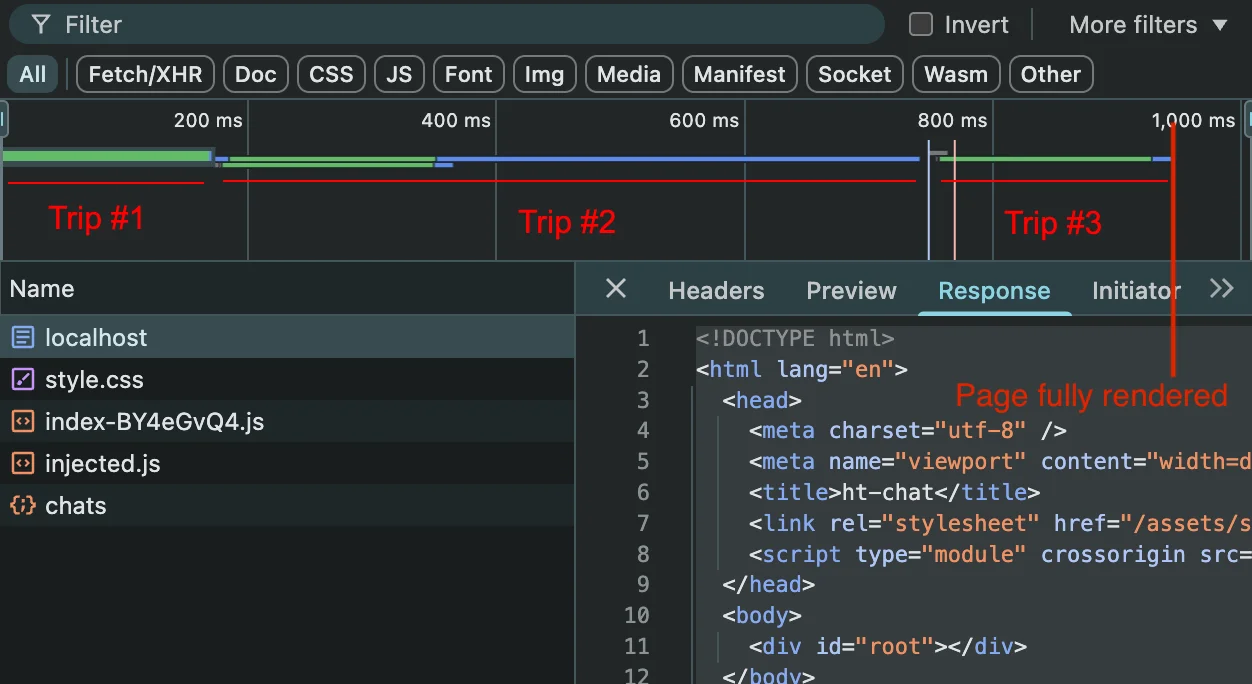
A picture of the browser devtools showing all three round trips. I’m simulating a fast 4G connection here to show the effect of higher latency.
This is necessary because we are rendering all the data on the client. But here, that’s not actually a requirement! We can get everything we need from just one browser request if we do the rendering on the server instead.
When we use HTMX, the server sends the page as HTML, with the necessary data already included. While a second round trip is necessary to download the HTMX library, it does not block page rendering, so the page is fully rendered after the first round trip finishes. In fact, strictly speaking, the main page doesn’t require HTMX at all.
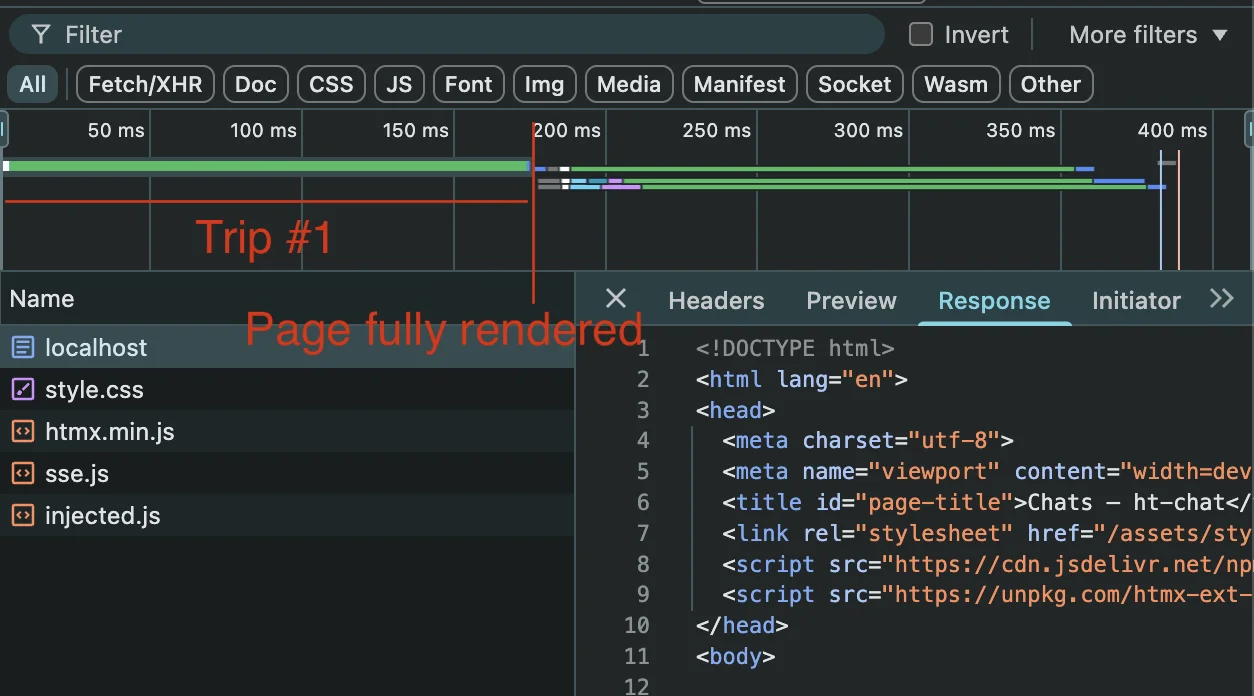 Note that the time axis is much shorter with the same simulated latency and throughput!
This means that, on our simulated 4G connection, the initial interaction with the HTMX app is about 5 times faster. You can even see this yourself if you visit both pages! Try opening both in incognito and see which one feels faster (HTMX) (React). Bonus points if your internet is slow.
What should you choose?
Maybe this all doesn’t convince you to use HTMX in your application, and that’s ok! But many frontend devs look at something like a streaming chat app and assume that React (or a similar SPA framework) will be necessary. You can see here that it’s just not the case. We get a smaller, faster, simpler application if we use HTMX and the browser’s native behavior.
Try hypermedia for your next project and see if it fits!
Footnotes
-
This snippet of code looks like it does nothing, but actually it is a manual way of serializing the
sqlite3.Rowobject. If I were doing a better job here I would have used Pydantic or something. ↩ -
The “HATEOAS and JSON” section of this essay explores this synchronization phenomenon in detail. ↩